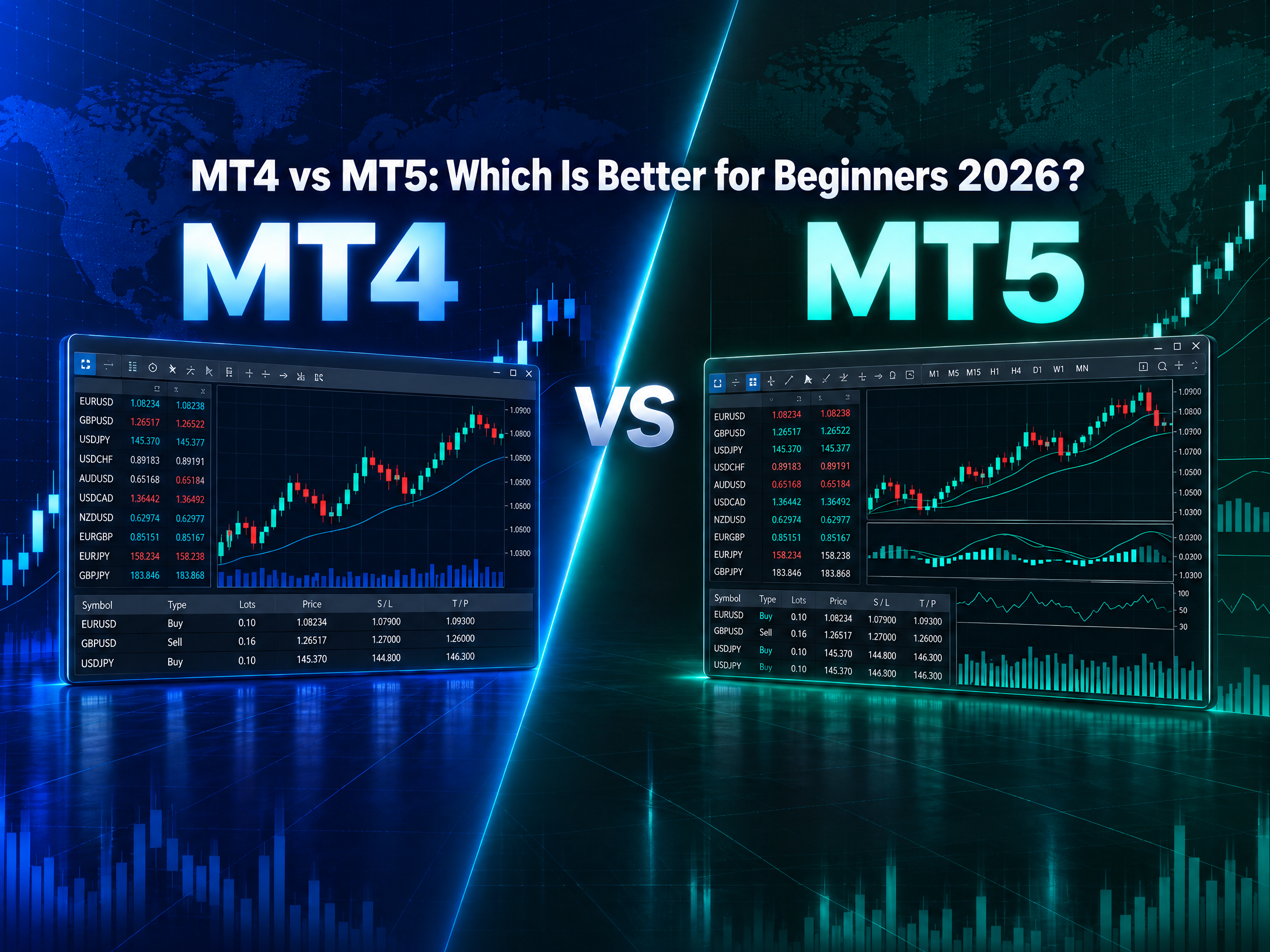
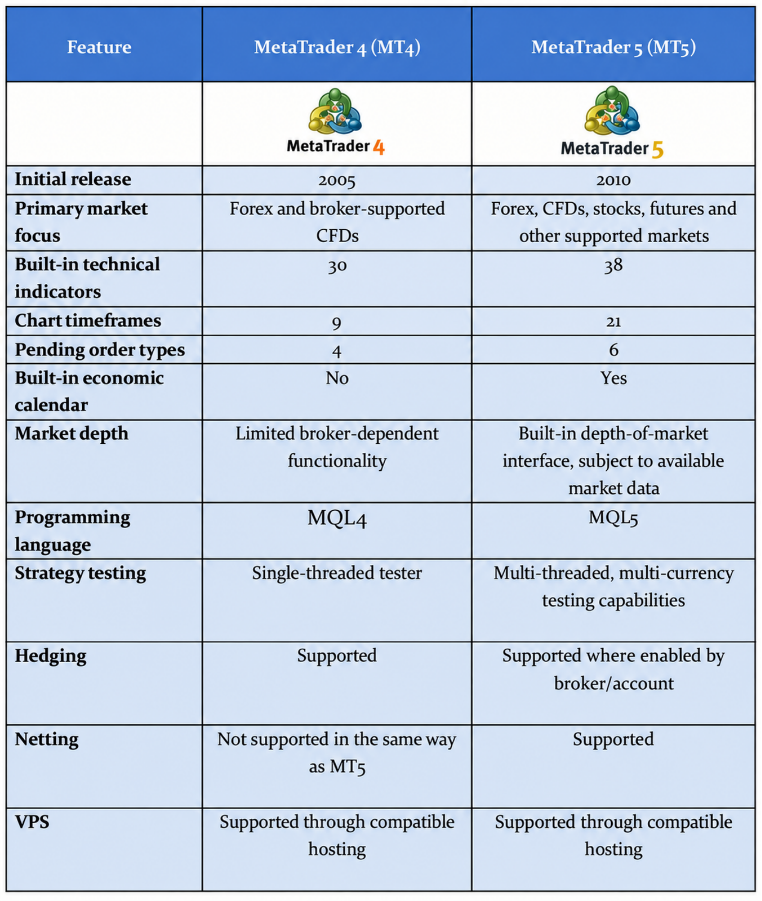
A beginner opens MetaTrader 5 and finds 21 chart timeframes, 38 built-in technical indicators, and six types of pending orders. MetaTrader 4 offers nine timeframes, 30 indicators, and four pending-order types.
The arithmetic suggests that MT5 is a more capable platform. Whether it is a better place to learn trading is another question.
MT4 and MT5 serve much the same purpose, but they offer different degrees of flexibility. MT4 covers the essentials of forex trading with fewer built-in features. MT5 adds more charting options, broader market support, and a built-in economic calendar. For beginners, the choice is less about which platform offers more tools than whether those tools will prove useful as their trading skills develop.
MT4 vs MT5: What Are the Main Differences?
MT5 offers a broader range of functions, while MT4 retains a simpler set of trading and charting tools.
Both platforms were developed by MetaQuotes. Launched in 2005, MT4 became a widely used platform among retail forex traders. MT5 followed in 2010, introducing a more flexible architecture designed to support multiple asset classes and different market structures.
Despite their similar names, MT5 is more than an updated version of MT4. The two differ in their underlying design, programming languages, and approach to order management.
Is MT4 Easier to Use Than MT5 for Beginners?
MT4 has fewer built-in features, but that does not make it easier to use.
Both platforms follow a similar trading workflow, with price charts, market quotes, order-entry windows and account information arranged within a familiar interface. Beginners can place market orders, set stop-loss and take-profit levels, and monitor open positions on either platform.
Consider a trader practising with a $500 demo account. After identifying a bullish moving-average crossover on the EUR/USD hourly chart, the trader decides to open a 0.01-lot buy position, with a stop-loss 20 pips below the entry and a take-profit 40 pips above it.
On MT4, the trader opens the order window, enters the position size, sets the stop-loss and take-profit prices, and clicks Buy by Market. MT5 follows much the same procedure, although its order window may include additional execution settings depending on the broker.
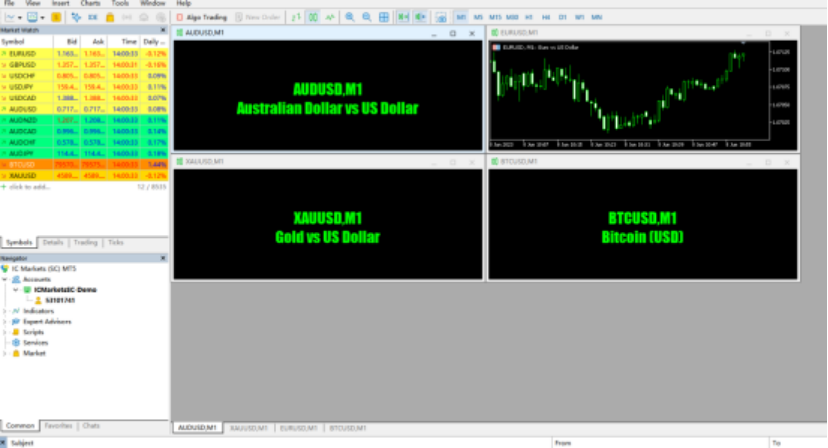
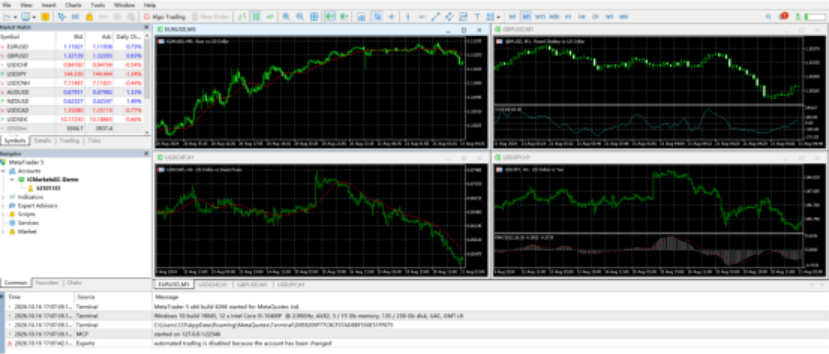
The distinction becomes clearer when comparing the two interfaces side by side.
The practical difference is modest. MT5 offers more advanced functions, but beginners placing ordinary market orders need not use them. MT4's simpler feature set may reduce distractions, though neither platform removes the need to understand position sizing, order execution and trading risk.
Does MT4's Simpler Interface Actually Help?
There is a reasonable argument for MT4. Its smaller selection of tools may reduce the temptation to experiment with every indicator or timeframe.
Yet this benefit should not be exaggerated. MT5 users can also restrict their workspace to a few charts and indicators.
A beginner who uses only an H1 chart, a moving average and a basic order-entry panel may notice little practical difference between the two platforms.
The greater challenge is understanding the trade itself.
For example, on EUR/USD, a standard lot of 100,000 euros has a pip value of approximately $10 when the account is denominated in US dollars. A 20-pip adverse movement on one standard lot would therefore produce a loss of about $200 before transaction costs.
That risk is the same whether the trade is placed through MT4 or MT5.
A beginner who misunderstands position sizing will not become safer merely by choosing the simpler platform.
The practical conclusion: MT4 may feel less crowded, but MT5 can be equally approachable when beginners limit themselves to essential functions.
Do MT5's Extra Timeframes and Indicators Help Beginners?
MT4 offers nine standard timeframes, ranging from M1 to MN1. MT5 expands this selection to 21, adding intervals such as M2, M3, M6, M10, M12, M20, H2, H3, H6, H8, and H12.
Yes, MT5's extra timeframes benefit traders by increasing their trading flexibility in the following ways:
Smoother Analysis Between Big Gaps: Jump from a 1-hour (H1) to a 4-hour (H4) chart in MT4 skips a massive 4x jump in time. MT5’s intermediate options—like H2 or H3—fill this gap, allowing traders to see trend structure unfold without losing detail.
Better Fit for Specific Market Hours: Stock indices, commodities, or specific forex sessions often run on non-4-hour cycles. For example, an 8-hour (H8) timeframe divides a 24-hour market day into 3 clean regional sessions (Asia, Europe, US).
Precise Trade Entries: Intra-day traders can use M2 or M3 charts to pinpoint entries with tight risk control (Stop Losses) right after a major economic news event, rather than waiting for a full 5-minute candle (M5) to close.
Let's see some quick examples to better understand this:
A beginner trading after work:
Assume a trader starts to trade after work. MetaTrader 5’s non-standard timeframes offer a distinct practical advantage. By using intermediate periods like the 2-hour (H2) chart to gauge evening momentum and a 10-minute (M10) chart to pinpoint entry levels, busy traders can spot clean setups and place pre-set orders within a short 30-minute window—eliminating the need to stay glued to screens waiting for standard hourly candles to close.
In this case, MT5's additional timeframes offer solid benefits.
A beginner studying short-term price movements:
Now consider someone observing EUR/USD around the London market opening.
The trader finds the M5 chart too noisy but the M15 chart too broad for examining a particular price movement.
MT5 offers an M10 chart as a standard option, allowing the trader to examine price action in ten-minute intervals.
MT4 does not provide M10 as a standard timeframe, although custom or offline-chart solutions may be available.
The additional interval offers greater analytical flexibility. It does not guarantee better entry signals.
Does MT5 Offer Better Order Execution and Risk Management?
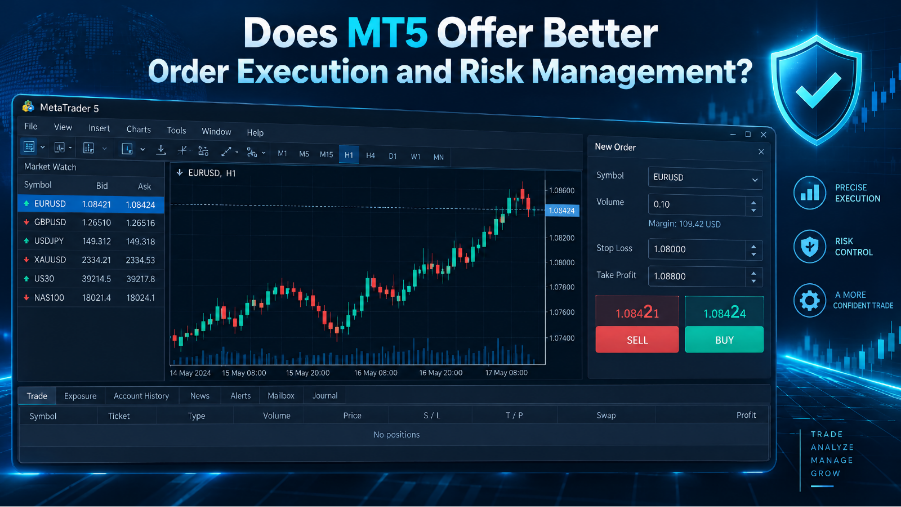
MT5 provides more order-management options, but neither platform guarantees faster execution or lower trading costs.
This distinction matters because trading-platform features are frequently confused with broker performance.
MT4 supports four pending-order types: Buy Limit, Sell Limit, Buy Stop and Sell Stop.
MT5 supports all four, plus Buy Stop Limit and Sell Stop Limit orders. These additional order types combine stop-price conditions with limit-order instructions.
A quick example: Trading a breakout
Suppose EUR/USD trades at 1.0800, and a beginner expects the price to rise above 1.0850.
On MT4, the trader could place a Buy Stop order at 1.0850. Once triggered, it becomes an instruction to buy according to the broker's execution rules. In a rapidly moving market, the execution price may differ from the requested price.
MT5 also offers a Buy Stop Limit order.
For example, a trader could set a stop trigger at 1.0850 and a subsequent buy-limit price at 1.0845. Once the trigger is reached, the platform places a buy-limit order at the specified limit price.
The advantage is greater control over the acceptable purchase price. The disadvantage is that the order may never be filled if the market continues rising without returning to the limit price.
That trade-off is important: avoiding an unfavourable execution price can also mean missing the trade entirely.
MT4 vs MT5 for Automated Trading: Does the Difference Matter?
MT5 has stronger built-in strategy-testing capabilities, but MT4 remains relevant for traders who already use MQL4-based tools.
Both platforms support automated trading through Expert Advisors (EAs). These programs can analyse market conditions and execute orders according to predefined instructions.
MT4 uses MQL4, while MT5 uses MQL5.
The languages share similarities, but programs are not directly interchangeable. An EA developed for MT4 generally requires adaptation or rewriting before it can run on MT5.
This creates a practical reason for some traders to retain MT4.
Example: Testing a moving-average strategy
Suppose a beginner wants to test a simple trading strategy:
Buy EUR/USD when a 20-period moving average crosses above a 50-period moving average.
Close the position when the shorter moving average crosses below the longer one.
Apply predefined position-sizing and risk rules.
Both platforms can test automated versions of this strategy against historical data.
MT5, however, provides a multi-threaded strategy tester with multi-currency testing and real-tick capabilities. MT4's built-in tester is single-threaded and more limited.
For a trader testing many parameter combinations, MT5 can complete the task more efficiently, depending on hardware, data availability, and test settings.
Yet more sophisticated backtesting does not necessarily produce more reliable trading strategies.
A strategy optimised against historical EUR/USD prices may perform poorly in future market conditions. Transaction costs, changing volatility and excessive parameter optimisation can all distort apparent profitability.
This is particularly important for beginners attracted to automated trading systems advertising unusually high historical returns.
A backtest is evidence of how a strategy behaved under specified assumptions. It is not evidence that the strategy will remain profitable.
Why Does MT4 Still Gain Much Popularity?
MT4 remains a reasonable choice when a trader relies on an existing MQL4 Expert Advisor, a custom indicator or a strategy that has been built and tested specifically for that platform. Moving to MT5 may require additional development work, compatibility testing and changes to the trading setup.
Another reason is that MT4 is a lightweight, low-latency platform built specifically for Forex. It runs seamlessly on minimal hardware without screen clutter, giving retail traders clean execution and essential charting without MT5's extra multi-asset complexity.
Which Platform Should Beginners Choose in 2026?
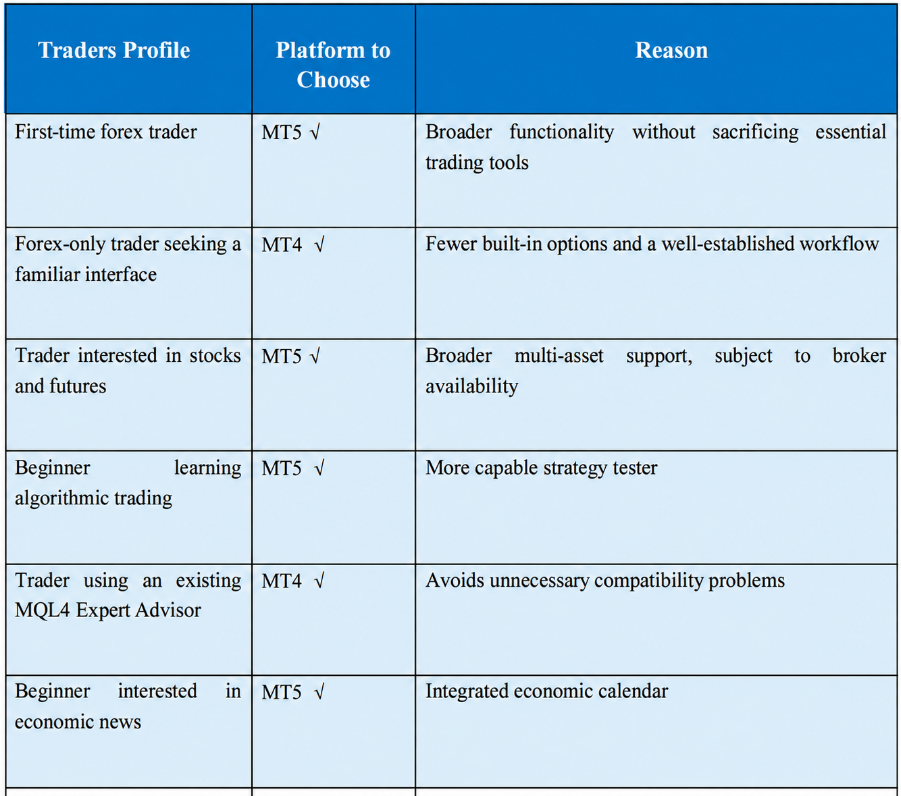
MT5 is the better default for most new traders, but MT4 remains a sensible choice when simplicity or compatibility is the priority.
The decision becomes easier when beginners consider what they actually intend to trade.
However, one further distinction is worth making: choosing a trading platform is not the same as choosing a broker.
MT4 and MT5 do not independently determine spreads, commissions, minimum deposits or the regulatory protections available to customers.
A beginner should therefore compare brokers separately, paying attention to the legal entity providing the account, its regulatory status and the actual trading conditions.
The sensible approach is to open a demo account, practise basic order placement and test the platform's essential functions before committing real money.
The Bottom Line
MT5 offers more timeframes, additional order types, broader market support and a stronger strategy-testing environment. For beginners starting in 2026 without existing software dependencies, it is generally the more practical long-term choice.
MT4, however, is far from obsolete. Its familiar interface and established library of trading tools remain useful, particularly for forex-focused traders.
The mistake is, however, to assume that a more sophisticated platform produces better trading decisions. Neither 21 timeframes nor 38 indicators can compensate for poor position sizing or an undisciplined strategy.
For beginners, therefore, the best platform is ultimately the one that makes essential trading tasks clear, supports the intended strategy and leaves room to develop new skills.
FAQs
Is MT4 or MT5 easier for beginners?
MT4 has fewer built-in functions, which some beginners may find less distracting. However, MT5 offers a similar basic trading workflow. Both allow users to place orders, analyse charts and manage positions. The difference in learning difficulty is relatively small for basic manual trading.
Is MT5 better than MT4 for forex trading?
MT5 offers more timeframes, pending-order types and analytical functions. However, MT4 remains sufficient for many conventional forex strategies.
Can I use MT4 and MT5 with the same trading account?
Usually, no. MT4 and MT5 operate on different trading systems, and brokers typically provide separate account types for each platform. Some brokers offer both, but users should confirm account compatibility before registering.
Does MT5 have lower spreads than MT4?
Not inherently. Spreads are determined primarily by the broker's pricing arrangements, liquidity and market conditions. Two accounts offered by the same broker may have different spreads or commissions, but these differences are not automatically caused by the trading platform.
Can beginners use Expert Advisors on MT4 and MT5?
Yes. Both platforms support automated trading through Expert Advisors. MT4 uses MQL4, while MT5 uses MQL5. Beginners should test automated strategies on demo accounts and understand their risks before considering live trading.

'%3e%3cmask%20id='mask0_5439_346'%20style='mask-type:luminance'%20maskUnits='userSpaceOnUse'%20x='0'%20y='0'%20width='32'%20height='32'%3e%3cpath%20d='M32%200H0V32H32V0Z'%20fill='white'/%3e%3c/mask%3e%3cg%20mask='url(%23mask0_5439_346)'%3e%3cpath%20d='M0%2010.7333C0%206.9367%200%205.0384%200.750577%203.59349C1.38308%202.37587%202.37588%201.38307%203.5935%200.750574C5.03842%200%206.93673%200%2010.7333%200H21.2667C25.0633%200%2026.9616%200%2028.4065%200.750574C29.624%201.383%2030.6167%202.37566%2031.2492%203.59311C31.249%203.5927%2031.2494%203.59351%2031.2492%203.59311C31.9996%205.03796%2032%206.93705%2032%2010.7333V21.2666C32%2025.0631%2032%2026.9615%2031.2494%2028.4064C30.617%2029.624%2029.6241%2030.6167%2028.4065%2031.2493C26.9616%2031.9999%2025.0633%2031.9999%2021.2667%2031.9999H10.7333C6.93673%2031.9999%205.03842%2031.9999%203.5935%2031.2493C2.37588%2030.6167%201.38308%2029.624%200.750577%2028.4064C0%2026.9615%200%2025.0631%200%2021.2666V10.7333Z'%20fill='url(%23paint0_linear_5439_346)'/%3e%3cpath%20d='M22.2222%2020.4448L22.9334%2016.0004H18.6667V12.8893C18.6667%2011.6448%2019.1112%2010.667%2021.0667%2010.667H23.1112V6.57821C21.9556%206.40043%2020.7112%206.22266%2019.5556%206.22266C15.9112%206.22266%2013.3334%208.44486%2013.3334%2012.4448V16.0004H9.33337V20.4448H13.3334V32.0004C15.1112%2032.0004%2016.8889%2032.0004%2018.6667%2032.0004V20.4448H22.2222Z'%20fill='white'/%3e%3c/g%3e%3c/g%3e%3cdefs%3e%3clinearGradient%20id='paint0_linear_5439_346'%20x1='16'%20y1='31.0649'%20x2='16'%20y2='0'%20gradientUnits='userSpaceOnUse'%3e%3cstop%20stop-color='%230062E0'/%3e%3cstop%20offset='1'%20stop-color='%2319AFFF'/%3e%3c/linearGradient%3e%3cclipPath%20id='clip0_5439_346'%3e%3crect%20width='32'%20height='32'%20fill='white'/%3e%3c/clipPath%3e%3c/defs%3e%3c/svg%3e)
'%3e%3cmask%20id='mask0_5439_355'%20style='mask-type:luminance'%20maskUnits='userSpaceOnUse'%20x='0'%20y='0'%20width='32'%20height='32'%3e%3cpath%20d='M32%200H0V32H32V0Z'%20fill='white'/%3e%3c/mask%3e%3cg%20mask='url(%23mask0_5439_355)'%3e%3cpath%20d='M24%200H8C3.58172%200%200%203.58172%200%208V23.9999C0%2028.4181%203.58172%2031.9999%208%2031.9999H24C28.4183%2031.9999%2032%2028.4181%2032%2023.9999V8C32%203.58172%2028.4183%200%2024%200Z'%20fill='black'/%3e%3cpath%20d='M24%200.5H8C3.85786%200.5%200.5%203.85786%200.5%208V23.9999C0.5%2028.142%203.85786%2031.4999%208%2031.4999H24C28.1421%2031.4999%2031.5%2028.142%2031.5%2023.9999V8C31.5%203.85786%2028.1421%200.5%2024%200.5Z'%20stroke='white'/%3e%3cpath%20d='M13.894%2013.008V12.02C13.5581%2011.9658%2013.2183%2011.939%2012.878%2011.94C8.71558%2011.9422%205.3406%2015.3136%205.33398%2019.476C5.33398%2022.042%206.61799%2024.286%208.56998%2025.65C7.26387%2024.2605%206.53711%2022.425%206.53798%2020.518C6.50998%2016.43%209.79998%2013.088%2013.894%2013.008Z'%20fill='%2300F2EA'/%3e%3cpath%20d='M14.08%2023.9922C15.928%2023.9922%2017.452%2022.5222%2017.532%2020.6782V4.2422H20.528C20.476%203.8942%2020.422%203.5482%2020.422%203.2002H16.328V19.6362C16.2549%2021.4883%2014.7315%2022.9516%2012.878%2022.9502C12.288%2022.9502%2011.754%2022.8182%2011.272%2022.5502C11.914%2023.4302%2012.932%2023.9922%2014.082%2023.9922H14.08Z'%20fill='%2300F2EA'/%3e%3cpath%20d='M23.016%207.98414C22.1109%206.94944%2021.6163%205.61885%2021.626%204.24414H20.528C20.8136%205.77756%2021.7121%207.12822%2023.016%207.98414ZM12.878%2016.0561C10.978%2016.0561%209.42603%2017.6061%209.42603%2019.5021C9.42603%2020.8401%2010.176%2021.9881%2011.272%2022.5501C10.872%2021.9901%2010.632%2021.2941%2010.632%2020.5461C10.632%2018.6461%2012.182%2017.0981%2014.082%2017.0981C14.428%2017.0981%2014.776%2017.1501%2015.098%2017.2581V13.0601C14.7621%2013.0059%2014.4223%2012.9792%2014.082%2012.9801H13.894V16.1861C13.5619%2016.1012%2013.2208%2016.0569%2012.878%2016.0541V16.0561Z'%20fill='%23FF004F'/%3e%3cpath%20d='M26.1459%209.82812V13.0081C24.098%2013.0202%2022.1005%2012.3737%2020.4479%2011.1641V19.5041C20.444%2022.317%2018.8763%2024.8944%2016.3802%2026.1914C13.8842%2027.4884%2010.874%2027.2898%208.56995%2025.6761C10.0041%2027.2091%2012.0087%2028.08%2014.1079%2028.0821C18.2704%2028.0799%2021.6453%2024.7085%2021.6519%2020.5461V12.2061C23.3129%2013.4007%2025.306%2014.0455%2027.3519%2014.0501V9.93412C26.9219%209.93412%2026.5219%209.90813%2026.1459%209.82812Z'%20fill='%23FF004F'/%3e%3cpath%20d='M20.42%2019.5041V11.1641C22.0809%2012.3588%2024.0741%2013.0037%2026.12%2013.0081V9.82814C24.9151%209.56028%2023.8275%208.91415%2023.016%207.98414C21.6999%207.13572%2020.7907%205.78321%2020.502%204.24414H17.532V20.6801C17.4579%2022.5314%2015.9348%2023.9936%2014.082%2023.9921C12.9678%2023.992%2011.9219%2023.4552%2011.272%2022.5501C10.1428%2021.9521%209.43358%2020.7819%209.42601%2019.5041C9.42601%2017.6041%2010.978%2016.0561%2012.878%2016.0561C13.226%2016.0561%2013.572%2016.1081%2013.894%2016.2161V13.0081C9.79024%2013.0899%206.50702%2016.4416%206.51001%2020.5461C6.51001%2022.5241%207.28601%2024.3401%208.54401%2025.6761C9.81533%2026.563%2011.3279%2027.0391%2012.878%2027.0401C17.0441%2027.0468%2020.4242%2023.6702%2020.422%2019.5041H20.42Z'%20fill='white'/%3e%3c/g%3e%3c/g%3e%3cdefs%3e%3cclipPath%20id='clip0_5439_355'%3e%3crect%20width='32'%20height='32'%20fill='white'/%3e%3c/clipPath%3e%3c/defs%3e%3c/svg%3e)
'%3e%3cmask%20id='mask0_5439_373'%20style='mask-type:luminance'%20maskUnits='userSpaceOnUse'%20x='0'%20y='0'%20width='32'%20height='32'%3e%3cpath%20d='M32%200H0V32H32V0Z'%20fill='white'/%3e%3c/mask%3e%3cg%20mask='url(%23mask0_5439_373)'%3e%3cpath%20d='M24%200H8C3.58172%200%200%203.58172%200%208V24C0%2028.4183%203.58172%2032%208%2032H24C28.4183%2032%2032%2028.4183%2032%2024V8C32%203.58172%2028.4183%200%2024%200Z'%20fill='%230A66C2'/%3e%3cpath%20d='M4.43994%207.80859C4.43994%209.28969%205.64159%2010.4913%207.12269%2010.4913C8.60512%2010.4913%209.80677%209.28969%209.80677%207.80859C9.80677%206.32616%208.60512%205.12451%207.12269%205.12451C5.64159%205.12451%204.43994%206.32616%204.43994%207.80859ZM4.76065%2026.3869H9.48606H9.48739V12.2093H4.76065V26.3869ZM12.5095%2026.3869H17.2841V17.9647C17.2841%2017.9647%2017.6354%2015.7743%2020.0747%2015.7464C22.5139%2015.7184%2022.4034%2017.9647%2022.4034%2017.9647L22.5139%2026.3869H27.2553V17.5469C27.2553%2017.5469%2027.2087%2014.2373%2025.371%2012.9731C23.8415%2011.9196%2022.8618%2011.9064%2022.1366%2011.8967C22.0466%2011.8955%2021.9605%2011.8943%2021.8778%2011.8913C21.1286%2011.8633%2019.3813%2012.0297%2018.3287%2012.7789C17.2748%2013.5281%2017.0872%2014.1655%2017.0872%2014.1655V12.2093H12.5095V14.2759V15.1635V26.3869Z'%20fill='white'/%3e%3c/g%3e%3c/g%3e%3cdefs%3e%3cclipPath%20id='clip0_5439_373'%3e%3crect%20width='32'%20height='32'%20fill='white'/%3e%3c/clipPath%3e%3c/defs%3e%3c/svg%3e)
'%3e%3cpath%20d='M24.5%200.5H8.5C4.08172%200.5%200.5%204.08172%200.5%208.5V24.4999C0.5%2028.9181%204.08172%2032.4999%208.5%2032.4999H24.5C28.9183%2032.4999%2032.5%2028.9181%2032.5%2024.4999V8.5C32.5%204.08172%2028.9183%200.5%2024.5%200.5Z'%20fill='black'/%3e%3cpath%20d='M24.5%200.5H8.5C4.08172%200.5%200.5%204.08172%200.5%208.5V24.4999C0.5%2028.9181%204.08172%2032.4999%208.5%2032.4999H24.5C28.9183%2032.4999%2032.5%2028.9181%2032.5%2024.4999V8.5C32.5%204.08172%2028.9183%200.5%2024.5%200.5Z'%20stroke='white'/%3e%3cpath%20d='M18.2779%2015.0714L25.2278%207.1665H23.5811L17.5439%2014.0288L12.7254%207.1665H7.16663L14.4547%2017.5444L7.16663%2025.8331H8.8133L15.1848%2018.5847L20.2745%2025.8331H25.8332L18.2779%2015.0714ZM16.0218%2017.6355L15.2823%2016.6015L9.40712%208.3812H11.9367L16.6795%2015.0177L17.416%2016.0517L23.5803%2024.6776H21.0507L16.0218%2017.6355Z'%20fill='white'/%3e%3c/g%3e%3cdefs%3e%3cclipPath%20id='clip0_5439_383'%3e%3crect%20width='33'%20height='32.9998'%20fill='white'/%3e%3c/clipPath%3e%3c/defs%3e%3c/svg%3e)
'%3e%3cpath%20d='M24%200H8C3.58172%200%200%203.58172%200%208V24C0%2028.4183%203.58172%2032%208%2032H24C28.4183%2032%2032%2028.4183%2032%2024V8C32%203.58172%2028.4183%200%2024%200Z'%20fill='white'/%3e%3cmask%20id='mask0_5439_390'%20style='mask-type:luminance'%20maskUnits='userSpaceOnUse'%20x='4'%20y='4'%20width='24'%20height='24'%3e%3cpath%20d='M28%204H4V28H28V4Z'%20fill='white'/%3e%3c/mask%3e%3cg%20mask='url(%23mask0_5439_390)'%3e%3cpath%20d='M14%2020V13L20%2016.512L14%2020ZM27.76%2011.667C27.76%2011.667%2027.525%2010.002%2026.806%209.268C25.893%208.305%2024.87%208.301%2024.401%208.245C21.043%208%2016.005%208%2016.005%208H15.995C15.995%208%2010.957%208%207.599%208.245C7.129%208.301%206.107%208.305%205.193%209.268C4.474%2010.002%204.24%2011.668%204.24%2011.668C4.24%2011.668%204%2013.622%204%2015.577V17.412C4%2019.368%204.24%2021.324%204.24%2021.324C4.24%2021.324%204.474%2022.989%205.193%2023.723C6.107%2024.686%207.306%2024.655%207.84%2024.756C9.76%2024.943%2016%2025%2016%2025C16%2025%2021.043%2024.992%2024.401%2024.748C24.871%2024.691%2025.893%2024.687%2026.806%2023.724C27.526%2022.99%2027.76%2021.324%2027.76%2021.324C27.76%2021.324%2028%2019.369%2028%2017.413V15.579C28%2013.623%2027.76%2011.667%2027.76%2011.667Z'%20fill='%23FF0000'/%3e%3c/g%3e%3c/g%3e%3cdefs%3e%3cclipPath%20id='clip0_5439_390'%3e%3crect%20width='32'%20height='32'%20fill='white'/%3e%3c/clipPath%3e%3c/defs%3e%3c/svg%3e)